Ruby On Rails
7 min

Exporting data to CSV from a Ruby on Rails application feels trivial with a few hundred records. But once your database holds millions of rows, that simple "Download CSV" button becomes a reliability risk. HTTP requests time out, Sidekiq workers get killed for exceeding memory limits, and downloaded files show up truncated at a seemingly random row count.
This is not a theoretical problem. Exports run fine on staging with 50,000 records and fail silently on production with 2 million. One unindexed query behind a "Download full report" button becomes a denial-of-service against your own database.
This guide breaks down exactly why large Rails CSV export operations fail and what patterns actually work in production, including streaming, async job architecture, query optimization, and a section on Active Storage security that every Rails team handling file uploads should read after the recent CVE-2026-66066 disclosure.
The patterns here come from production systems Essence Solusoft has built and maintained for SaaS, e-commerce, and finance applications.
The Standard Rails CSV Export Pattern
Ruby's built-in CSV library (part of the standard library since Ruby 1.9) makes parsing and generating CSV files straightforward. The classic pattern uses CSV.generate for in-memory string generation inside a model method, then sends the result from a controller.
A typical setup defines a to_csv class method on a model (for example, Product) that adds a header row with column names like product_id, name, and price, then iterates through records to write each row as an array of attributes. In the controller, the index action uses respond_to with format.csv and send_data to trigger the download, setting the filename and Content-Type headers.
For quick one-off exports from the Rails console, CSV.open writes directly to a local file. Complex data types like JSON or serialized attributes need to be converted to a string representation before export.
This approach works for a few thousand records. Beyond that, the entire result set sits in memory as Ruby objects plus a growing CSV string, and your server process starts to buckle.
Failure Modes: What Goes Wrong at Scale
When exporting data at scale, multiple failure modes compound. Here is what actually happens.
Memory blow-up. Model.all loads every record into memory as ActiveRecord objects. CSV.generate then builds a giant string. On a 2–4 GB app server, this leads to OOM kills. One benchmark showed a naive export of 1 million rows consuming roughly 76 MB of memory for the CSV string alone, before counting the ActiveRecord objects themselves.
Request timeouts. Most load balancers and reverse proxies cut off requests that do not send data within 30 seconds. Your export hangs while generating, the proxy kills it, and the user sees nothing. On Heroku, this surfaces as H12 errors. Behind Nginx, the connection drops silently.
Database pressure. Unindexed queries, ORDER BY on large tables without proper indexes, and N+1 joins when fetching associations per row can lock your database for minutes. One "Download full report" button becomes a denial-of-service against your own infrastructure.
Browser and spreadsheet limits. Users who try to open 200 MB+ CSV files in Excel or Google Sheets see crashes or silently truncated records.
Background job misuse. Moving the export to Sidekiq but still using CSV.generate in the worker just moves the memory problem from the web process to the job process. The worker gets killed the same way.
These problems are not version-specific. Rails 5.2 through Rails 8.x all hit the same bottlenecks if exports are not designed for scale.
Streaming CSV: The Right Way to Export Large Datasets
Streaming prevents excessive memory consumption by sending CSV data in chunks as rows are generated, rather than building one giant string.
The key technique is using find_each or in_batches (default batch size of 1,000) to load records in small groups, keeping memory flat regardless of total row count. Generate one row at a time with CSV.generate_line instead of accumulating everything with CSV.generate.
The response headers matter. Set Content-Type: text/csv, Content-Disposition: attachment; filename="export.csv", Cache-Control: no-cache, and X-Accel-Buffering: no to prevent Nginx from buffering the entire response before sending it to the client.
In Rails 7.2+, send_stream provides a cleaner API for this. For older versions, use ActionController::Live and write directly to response.stream.
Benchmarks show streaming exports of 1 million rows hold memory steady near 1 MB, compared to 76 MB+ for the in-memory approach. That is the difference between an export that runs reliably and one that gets OOM-killed on a random Tuesday.
Test streaming with realistic production volumes. If your production system has 5 million records spanning a multi-year date range, test against that. Verify memory stays flat across the entire export.
Async Jobs and Export Architecture for Very Large Files
When a CSV export regularly takes more than 20–30 seconds or involves multi-million-row tables with heavy joins, move it out of the web request entirely.
The architecture is straightforward. The user clicks "Export data." The controller enqueues a background job with filters, date range, and user ID. The job writes CSV incrementally using CSV.open with write mode ('wb'), appending rows in batches to a temporary file, never holding the entire CSV in memory. Once complete, the job uploads the file to cloud storage (S3 or equivalent) and sends the user a secure download link via email or in-app notification.
Design jobs for idempotency: re-running should overwrite, not duplicate. Clean up old exports via a scheduled task. Delete files older than 7 to 30 days depending on your compliance requirements.
For multi-tenant SaaS, add per-tenant export limits and isolation so one customer's massive export cannot degrade the process for everyone else. For finance applications, combining async exports with streaming downloads from object storage means historical exports covering years of invoices never stress web dynos at all.
Query Optimization for Fast, Safe CSV Export
Good Rails CSV export performance depends more on how you query your database than on Ruby code.
Add indexes on filter columns: dates, foreign keys, status fields. Without an index on created_at, a large date-range export triggers a full table scan. This is the single most common cause of export-related database slowdowns.
Avoid SELECT *. Create export-specific scopes that select only the columns you need. Exclude large text, JSON, or XML fields that will never appear in the CSV output. They consume memory and transfer time for nothing.
Preload associations per batch with includes, not across the entire scope. Preloading millions of associated records at once defeats the purpose of batching. Load 1,000 records with their associations, generate those CSV rows, then load the next 1,000.
Use cursor-based pagination (by primary key or timestamp) instead of offset-based pagination for deep exports. Offset pagination degrades as the offset grows. Rails 8 supports cursor: in find_in_batches for this exact use case.
Direct large export queries to a read replica or reporting database to keep your primary database responsive for users who are not waiting on an export.
Add explicit ORDER BY (for example, created_at, id) so rows come back in a consistent, correct order. This matters when comparing monthly exports or debugging data issues.
Before releasing any new export feature, run EXPLAIN on the largest expected date range and check for missing indexes or unexpected sequential scans.
Security: Active Storage, CVE-2026-66066, and Why Exports Need the Same Rigor
If your Rails application handles file uploads alongside data exports, the security surface is wider than most teams realize. The recent CVE-2026-66066 disclosure, and Mike Dalessio's Rails World 2026 talk explaining it, made that painfully clear.
Here is what happened: Active Storage versions before 7.2.3.2, 8.0.x before 8.0.5.1, and 8.1.x before 8.1.3.1 did not disable unsafe libvips operations for untrusted content. An attacker who could upload a crafted file could exploit the image processing pipeline to read arbitrary files from the server, and potentially escalate to remote code execution. Rails has used :vips as the default variant processor since Rails 7.0 defaults, making the attack surface broad.
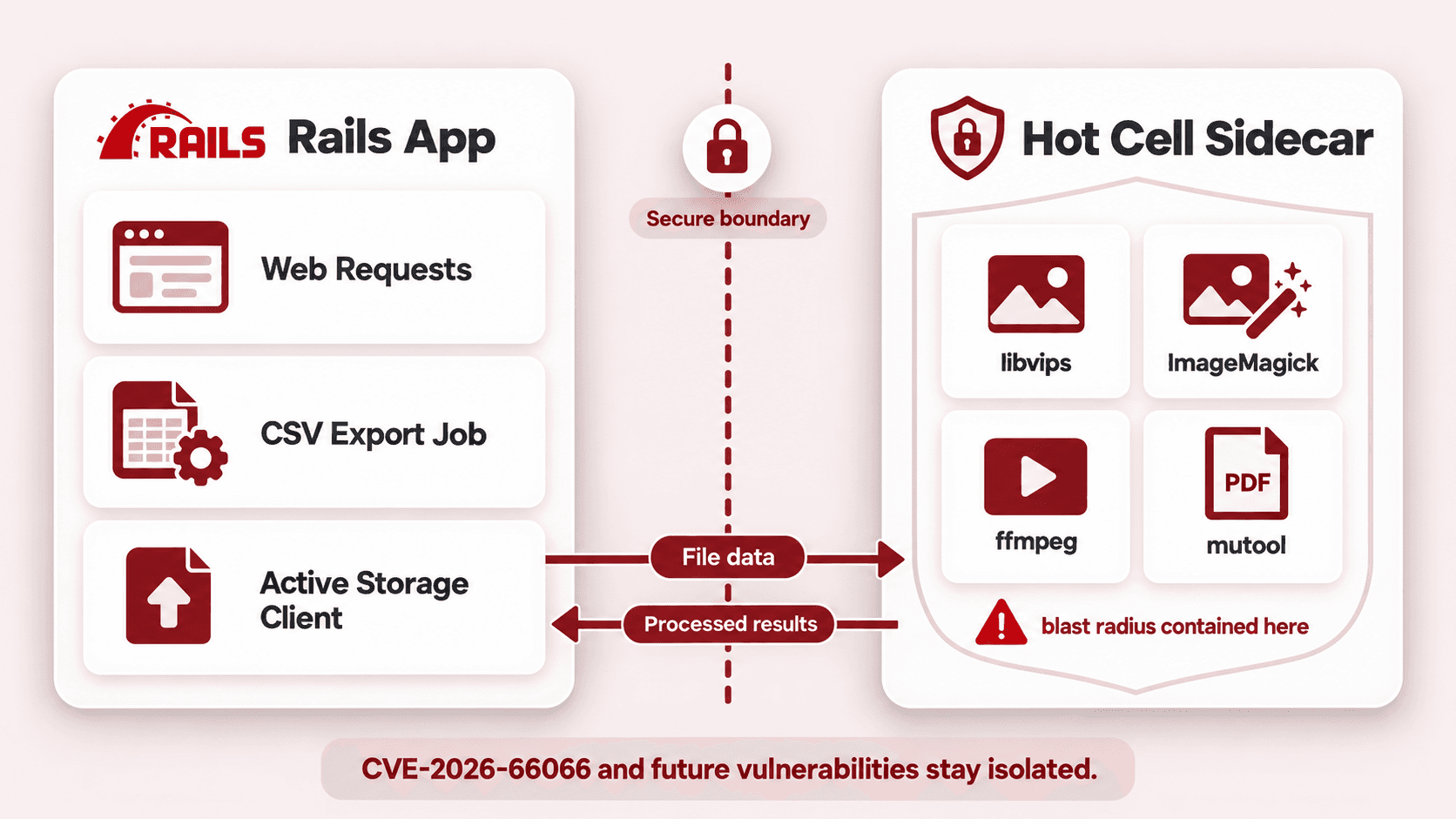
Dalessio's talk, titled "Hot Cell: Securing Active Storage in the age of AI," makes two points worth repeating. First, AI-assisted security researchers are finding vulnerabilities in Active Storage faster than the Rails team anticipated. The library was not designed for this volume of scrutiny. Second, the fix is architectural: move attachment processing out of your Rails application process and into a secure sidecar container.
That is exactly what Hot Cell does. It is a suite of gems (built by Dalessio and used at 37signals) that isolates image transformation, media analysis, PDF previews, and video previews in a separate container. Even if a vulnerability exists in libvips, ImageMagick, or ffmpeg, the blast radius is contained. Your Rails process never runs the vulnerable code.
What This Means for CSV Exports
The connection to data exports is direct. Many Rails applications that export CSV data also handle file uploads through Active Storage. If your export pipeline touches uploaded files (generating thumbnails for a report, including attachment metadata in exports, or processing uploaded CSVs before re-exporting them), those files pass through the same image processing pipeline that CVE-2026-66066 targeted.
Concrete steps to take:
Upgrade Rails to at least 7.2.3.2, 8.0.5.1, or 8.1.3.1 immediately if you have not already
Upgrade libvips to version 8.13 or later
Rotate
secret_key_base, database credentials, and Active Storage service credentials as the Rails advisory recommendsEvaluate Hot Cell for isolating attachment processing in a sidecar container, especially if your application accepts untrusted uploads
Never export sensitive file metadata (internal paths, storage keys, processing parameters) in CSV output. This is an information leak that makes exploitation easier
Log every export and every file upload with user identity, timestamp, and scope for audit trails
The broader lesson: building a CSV export feature in isolation, without considering the security posture of the file handling infrastructure around it, leaves gaps. Exports, uploads, and attachment processing share a trust boundary. Harden them together.
UX, Reliability, and Access Control
A good data export feature goes beyond code. It needs clear UX, safety guardrails, and proper access control.
Show immediate feedback when the user triggers an export: "Your export is being prepared." For async exports, send an email notification with the download link and display the date, filters, and scope used on the export status page.
Set limits. Cap the maximum date range (12 to 24 months per request is a reasonable default), add row caps for extremely large tables, and throttle export frequency per user or account. Without these guardrails, a single user can accidentally create a queue of exports that degrades the system for everyone.
Only authenticated users should be able to create and download CSV files. Use signed, expiring URLs for download links. Verify that users can only export records belonging to their organization. This is especially critical in multi-tenant SaaS.
Log every export: who triggered it, what filters were applied, when it ran, and how many records were included. This is not optional for compliance in finance, healthcare, or enterprise contexts.
Audit which attributes are included in export output. Never export password hashes, internal tokens, API keys, or comments marked as internal. Consider masking sensitive columns per privacy regulations like GDPR or CCPA. Review export endpoints regularly, especially in legacy Rails applications where the original developer may not have anticipated the data the system now holds.
Beyond CSV: Excel, TSV, and Alternative Formats
CSV is not always the right format. The choice depends on who consumes the data.
CSV files use commas as delimiters; TSV files use tabs. Excel actually handles tab-separated values more reliably than comma-separated values in many cases, and TSV is simpler to generate since you do not need to worry about quoting fields that contain commas.
There are encoding traps. TSV files must be encoded in UTF-16 Little Endian for Excel to read them correctly on Windows. Without this encoding, non-ASCII characters break. For UTF-8 CSV files, adding a Byte Order Mark (BOM) helps Excel interpret the encoding correctly.
Excel does not handle newlines within fields well. Sanitize or strip them before export. CSV injection (cells starting with =, +, -, @) is a real security risk that can execute formulas on the recipient's machine. Prefix these characters in your export code.
For richer output, the axlsx gem generates .xlsx files with multiple worksheet tabs and formatting. The axlsx_rails gem integrates it with Rails controllers so you can render Excel output from template views. The spreadsheet gem handles basic .xls creation for legacy compatibility.
Choose your format based on the consumer: CSV for integrations, import pipelines, and API consumers; Excel for business users building dashboards; HTML for on-page previews and printable reports. Regardless of format, the same core principles apply: batch your queries, stream where possible, and do not let your server do unnecessary work.
Build Exports That Scale Before the Next Load Spike
Every pattern in this guide exists because we have seen the alternative fail in production: truncated files, crashed workers, locked databases, and security gaps that stayed open for years because nobody audited the export endpoint.
The fix is not complicated. Stream instead of buffering. Batch your queries. Move heavy exports to background jobs. Index your filter columns. Audit what you export. And after CVE-2026-66066, take Active Storage security as seriously as you take your export architecture.
Essence Solusoft helps teams design robust export strategies across CSV, Excel, and APIs that scale with data growth, from early-stage MVPs through mature enterprise Rails applications. If your project's export button is a ticking time bomb, reach out before the next load spike hits.
Sources
Rails security advisory: CVE-2026-66066: Possible arbitrary file read and RCE in Active Storage variant processing
Mike Dalessio, "Hot Cell: Securing Active Storage in the age of AI", Rails World 2026
Hot Cell gems on RubyGems: Secure sidecar for Rails Active Storage processing

Written by
Agnesh Vekariya
Senior Shopify App Developer
Senior Shopify App Developer with expertise in building scalable Shopify apps, custom e-commerce solutions, and high-performance integrations. Passionate about creating intuitive merchant experiences, writing clean and maintainable code, and developing tools that help Shopify stores grow through practical, reliable solutions.
Reader guide
Use the links below to jump into next reading without leaving the article flow.
Blog categories
Recent posts
AI Integration in Rails: Adding AI Features Without Rebuilding Your Application
7 min
Rails Performance Optimization: Why Your Application Gets Slower Under Load
8 min
Rails CSV Export: Why Large Data Exports Fail and How to Build Them Properly
7 min
Rails Background Jobs: Why Customers Shouldn’t Wait for Work That Can Run Later
6 min

Similar Blogs